Make every hello count.
Your AI answers from your services, pricing, FAQs, and documents. Help visitors take the next step with answers grounded in your business.
Meet your next teammate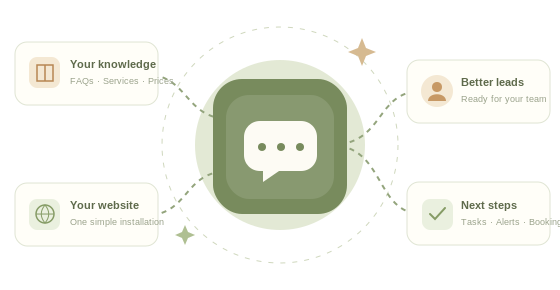
LeadVaani is a free AI chatbot for lead generation that answers customer questions 24/7 using your business information. Collect contact details, understand enquiries, and give your team a clear next step, even outside office hours.
Less repetitive work.
More room for your next big thing.
An AI chatbot for business helps visitors get useful answers before they decide to contact you. Instead of asking every visitor to fill out a form immediately, start with their question and offer a relevant next step. Your team can focus on enquiries with context rather than repeat the same explanations all day.
Your AI answers from your services, pricing, FAQs, and documents. Help visitors take the next step with answers grounded in your business.
Meet your next teammateCapture contact details, understand customer needs, and use lead scores to help your team prioritize.
Tag leads, create tasks, send email alerts, and connect events to your CRM through signed webhooks.
Let visitors request appointments in the chat. Your team reviews and confirms the details.
Track conversations, lead conversion, and usage from your dashboard. Grow with clearer insight.
Import website pages, add FAQs, and share your services and documents.
Choose your widget’s style, greeting, and the details you want to capture.
Install your snippet, test your assistant, and manage new opportunities in your dashboard.
Write formatted messages, select your leads and queue individual emails. Review sending status and keep each recipient's address private.
Create your accountOpen a draft containing the customer's requirement, contact details and your business information. Review it in WhatsApp Web and send it yourself.
View plansTry the demo agency’s assistant. Ask about website development, SEO, or services and see how your visitors could experience your business.
Open the live demo The walkthrough uses sample data. Use the live demo to try a real conversation.A genuine lead is someone who chooses to share an enquiry your business can act on. LeadVaani gives you the conversation alongside the contact details, so your first follow-up can address the visitor's actual need. Conversion still depends on your offer, traffic quality, and how your team responds.
Explain your services, answer questions about your process, and ask what a visitor wants to achieve. A website agency could collect the project type and preferred contact method before a team member prepares a proposal. Show accurate pricing guidance rather than promise a custom quote the AI cannot approve.
Help prospective students explore courses, schedules, eligibility, and admission steps. Invite them to request a counselling appointment when they need personal guidance. Keep course information current and ask only for the details your admissions team needs to respond.
Answer questions using the product and policy information you supply. Explain delivery areas, returns, or product differences before asking whether the visitor needs assistance. Check answers against your current policies; the chatbot should not imply it has live inventory or order access you have not connected.
Let visitors request a consultation or visit without waiting for office hours. Your team reviews and confirms each appointment request. A request is not a guaranteed booking, and the assistant should not promise a time slot your team has not approved.
The best fit depends on your website and the work you want to reduce. This compares common approaches, not specific vendors. Other platforms may combine several of these capabilities; check their current plan details and test them with your own business questions.
| What you need | LeadVaani | Rule-based chatbot | Staffed live chat |
|---|---|---|---|
| Customer answers | AI answers using supplied business knowledge | Prepared replies and configured branches | A team member writes each reply |
| After-hours replies | Automated replies while service and usage are available | Configured flows can run after hours | Depends on staff availability |
| Lead follow-up | Contact capture, conversation context, and dashboard follow-up | Depends on the flow and platform | Depends on your team process and tools |
| Setup | No-code dashboard plus website snippet installation | Design and maintain conversation branches | Install chat and arrange staffing |
| Free access | Free plan with the limits displayed below | Varies by provider | Software and staffing costs vary |
Try the AI chatbot business demo with a common customer question, then read the website chatbot installation guide to check your setup. Review our privacy policy and data choices before adding customer information.
A no-code chatbot removes the need to build your own conversation interface. It still needs good information and regular attention. Start with a small set of reliable answers, check unclear replies, and make it easy for visitors to request a person. Your team can review conversations and respond through the dashboard.
An automated chatbot can make your enquiry process more consistent, but it cannot guarantee sales or perfectly accurate answers. Review lead quality alongside conversation volume. Optional visitor analytics starts after consent, so those reports will not count every visitor. Keep your contact details correct and follow up promptly on requests that need your judgement.
Start Free, no credit card. Check the conversation, lead, team, and widget limits below before choosing a plan. Paid access is monthly or yearly prepaid, with manual renewal.
Get your first conversations going.
Give your growing business more room.
Give your growing business more room.
Bring your clients along for the journey.
Pay securely with Razorpay. View billing history and download invoices in your account. Renew manually at the end of your prepaid period.
This chatbot service is provided by Digi Digital Solution, bringing website development, SEO, social media growth, and digital marketing together to help businesses grow.
Owner of Digi Digital Solution and developer of this chatbot service. Combining computer science training with practical expertise across digital growth marketing.
Responsive websites and development that connect visitors with your business.
SEO and digital marketing expertise to help your audience find you.
Social media growth and a connected approach to your marketing.
Yes. LeadVaani has a Free plan with usage limits displayed in the pricing section. Create an account without a credit card, test your business answers, and upgrade only if you need more capacity.
You manage knowledge, greetings, and widget design in a no-code dashboard. Installation uses a small JavaScript snippet that you or your website administrator adds to a site that permits custom scripts.
Your website pages, documents, FAQs, services, products, and policies. You control the information it can use. Test answers before publishing and update your knowledge when your business changes.
Yes. Your team can review conversations and respond from the dashboard when a visitor needs a human. Appointment requests also need your team to review and confirm the details.
The website widget can show a WhatsApp contact link when you configure one. That opens WhatsApp for the visitor; it is not a native WhatsApp messaging bot or an automated WhatsApp campaign service.
Choose a monthly or yearly prepaid plan and pay through Razorpay. Access activates after payment verification. View payment history, download paid invoices, and check expiry in your dashboard. Renewals are manual.
Your next opportunity starts with a simple hello.
Ideas and practical guidance for your business.
Compare AI chatbot software for small businesses and startups. Learn key features, use cases, and practical tips for choosing the right tool.
Read articleLearn how to choose and use a free AI chatbot, set it up for common tasks, and avoid common pitfalls with this practical guide.
Read articleLearn how to add an AI chatbot to your website without coding. Follow simple steps to register, customize, embed, and test a chatbot like LeadVaani.
Read article